
KIA Niro: Rear Bumper beam Assembly
Kia Niro - First generation - (DE) (2017-2022) - Service and Repair Manual / Body (Interior And Exterior) / Rear Bumper / Rear Bumper beam Assembly
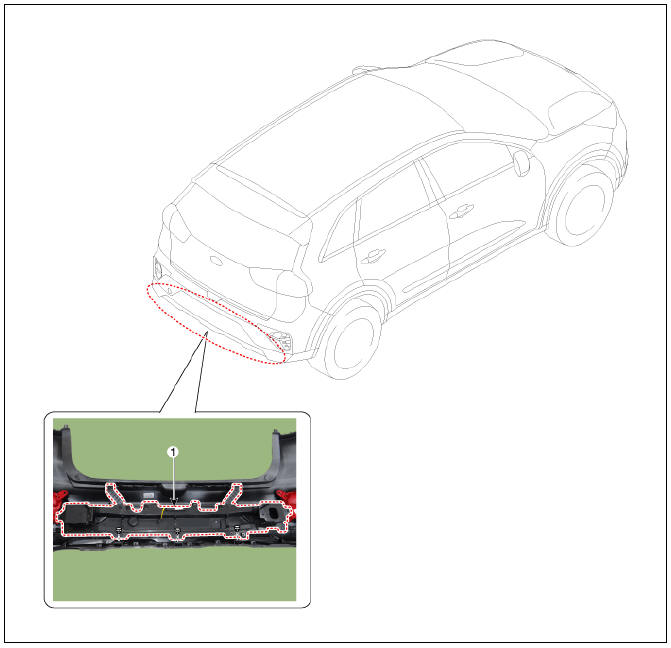
- Rear bumper beam assembly
Replacement
Warning
Put on gloves to protect your hands.
Warning
- Use a plastic panel removal tool to remove interior trim pieces without marring the surface.
- Be careful not to bend or scratch the trim and panels.
- Remove the rear bumper assembly.
(Refer to Rear Bumper - "Rear Bumper Assembly")
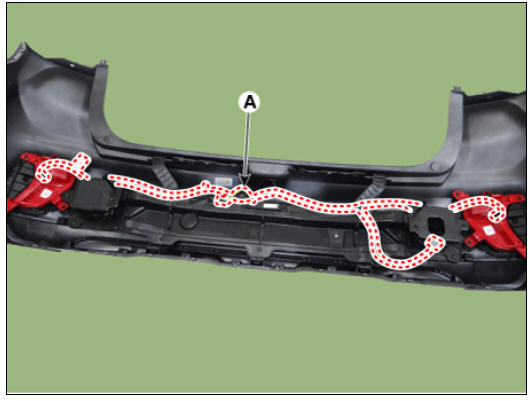
- Disconnect the rear bumper beam mounting wiring harness (A).
- After loosening the mounting clips, remove the rear bumper beam assembly (A).
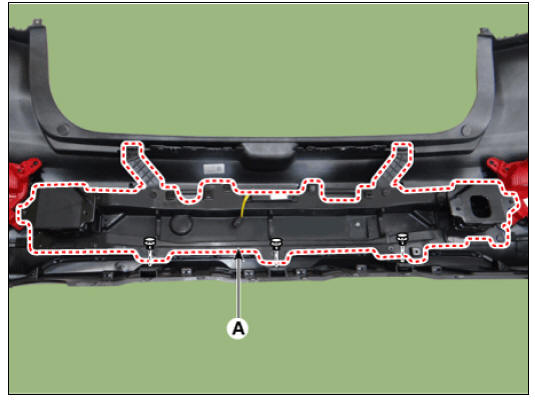
- To install, reverse the removal procedure.
Warning
- Replace any damaged clips (or pin-type retainers).
- Make sure the connector are connected in properly.
READ NEXT:
 Rear Door / Repair Procedures
Rear door trim
Rear door delta inner cover
Rear door panel & module
Rear door delta lower run & channel
Rear door side weatherstrip
Rear door body side weatherstrip
Rear door window glass run
Rear door delta moulding
Rear
Rear Door Trim
Rear Door Trim Components and components location
Rear door trim
Rear Door Trim Repair procedures
Replacement
Remove the rear door delta inner cover (A) using a remover.
Remove the rear door inside cap (A) and then loosen th
SEE MORE:
Heating, Ventilation And Air Conditioning / Troubleshooting
Problem Symptoms Table
Before replacing or repairing air conditioning components, first determine if
the malfunction is due to
the refrigerant charge, air flow or compressor.
Use the table below to find the cause of the problem. The numbers in
Wireless smart phone charging system
Indicator
Charging pad
Operation
Place the smartphone at the center of
the wireless charging pad.
The indicator light will change to
orange once the wireless charging
begins. The light will change to green
when charging is c
Categories
- Home
- KIA Niro EV, Hybrid - Second generation - (SG2) (2021-2024) - Owner's manual
- Kia Niro - First generation - (DE) (2017-2022) - Service and Repair Manual
- Contact Us
