
KIA Niro: Drive mode integrated control system
KIA Niro EV, Hybrid - Second generation - (SG2) (2021-2024) - Owner's manual / Driving your vehicle / Drive mode integrated control system
DRIVE MODE
Selecting DRIVE MODE
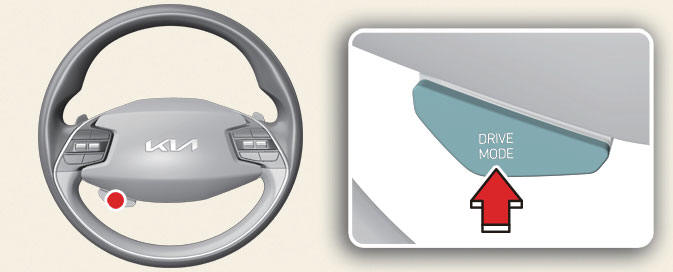
Operation
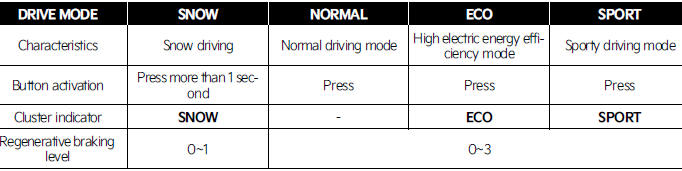
- Press the DRIVE MODE button.
- Press and hold DRIVE MODE button to change to SNOW mode.
- DRIVE MODE will change to NORMAL
mode when the vehicle is
restarted. ECO mode will be maintained
when the vehicle is restarted.
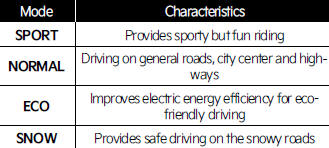
DRIVE MODE characteristics- (Kia Niro EV)
DRIVE MODE button
Infotainment system

NOTICE
- If there is a problem with the instrument cluster, the drive mode will be in NORMAL mode and may not change to ECO mode or SPORT mode.
- Efficiency depends on the driver's driving habit and road condition.
- In SPORT mode, the electric energy efficiency may decrease.
- When you mildly drive the vehicle in NORMAL mode, the driving mode changes to ECO mode to improve electric energy efficiency. However, the actual efficiency may differ in accordance with your driving situations.
INFORMATION
It is possible to set the climate system control and brake mode separately.
Select Settings → Vehicle → Drive mode → Brake mode or ECO mode climate control from the infotainment system.
For more information, refer to the manual provided in the infotainment system and the quick reference guide.
READ NEXT:
 Active air flap
Active air flap system controls the air
flap below the front bumper to cool the
vehicle parts and improve energy efficiency.
Active air flap malfunction
A: Check Active Air Flap System
The active air flap system may not operate
normally
Green Zone Drive Mode for Europe (Kia NIRO Hybrid)
In order to protect the atmospheric environment
in urban areas, EV mode is
expanded when entering the road inside
the green zone based on the navigation
information.
Also, EV mode is expanded based on the
driving history when departing from
Forward Collision-Avoidance Assist (FCA) (Sensor Fusion)
Forward Collision-Avoidance Assist (FCA) (Sensor
Fusion) (if equipped)
Forward Collision-Avoidance Assist is
designed to help detect and monitor the
vehicle ahead or help detect pedestrian
or cyclist in the roadway and warn the
driver th
SEE MORE:
Seatback pocket
Seatback pocket
USB charger
WARNING
Loose objects in the driver's foot area
could interfere with the operation of
the foot pedals, possibly causing an
accident.
When you return the seatback to its
upright position, hold
Emergency Stop Signal (ESS)
The Emergency Stop Signal (ESS) alerts
the driver behind by flashing the brake
lights when braking sharply and
severely.
Operating condition(s)
The vehicle suddenly stops.
ABS is activated and the driving speed
is over 55 km/h (34 mph).
Categories
- Home
- KIA Niro EV, Hybrid - Second generation - (SG2) (2021-2024) - Owner's manual
- Kia Niro - First generation - (DE) (2017-2022) - Service and Repair Manual
- Contact Us
