
KIA Niro: Climate control air filter
KIA Niro EV, Hybrid - Second generation - (SG2) (2021-2024) - Owner's manual / Maintenance / Climate control air filter
Replacing the climate control air filter
Operation
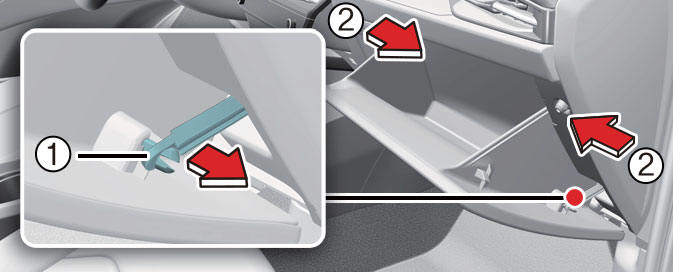
- Open the glove box and remove the stopper (1). With the glove box open, remove the glove box by pushing the both sides of it (2).
- Remove the climate control air filter cover (2) by pulling out both sides (1) of the cover.
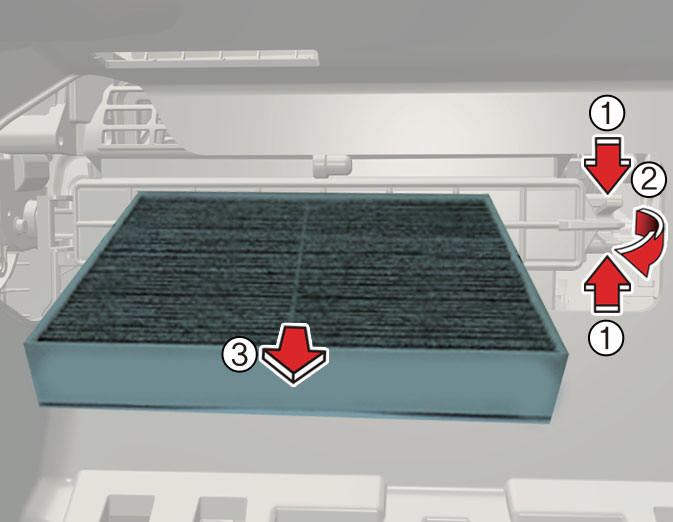
- Replace the climate control air filter (3).
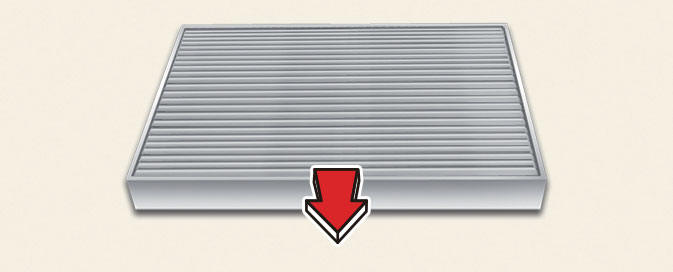
- Reassemble in reverse order of disassembly.
NOTICE
- When replacing the climate control air filter install it properly. Otherwise, the system may produce noise and the effectiveness of the filter may be reduced.
- If the vehicle is operated in extremely dusty or sandy areas, replace the element more often than the usual recommended intervals.
READ NEXT:
 Replacing the front wiper
blade (Kia NIRO Hybrid)
Replacing the front wiper
blade (Kia NIRO Hybrid)
Operation
Turn off the vehicle.
Move the wiper switch to the single
wiping (MIST/1x) position.
Hold the wiper switch for more than 2
seconds.
Type A (if equipped)
Raise the wiper arm.
Lift the wiper blade clip up. Pull
dow
Replacing the front wiper blade (Kia Niro EV)
Operation
Turn off the vehicle.
Move the wiper switch to the single
wiping (MIST/1x) position within 20
seconds.
Hold the wiper switch for more than 2
seconds.
Raise the wiper arm.
Lift the wiper blade clip up (1). Pull
down t
SEE MORE:
Normal charging port
Removal
Warning
Be sure to read and follow the "General Safety Information and
Caution" before doing any work related
with the high voltage system. Failure to follow the safety instructions may
result in serious electrical
in
Coolant Repair procedures
Refilling And Bleeding
Warning
Never remove the cap when the engine is hot. Serious scalding could
be caused by hot fluid under high pressure escaping
from the reservoir.
Warning
When pouring inverter coolant, be sure to shut the relay box lid
Categories
- Home
- KIA Niro EV, Hybrid - Second generation - (SG2) (2021-2024) - Owner's manual
- Kia Niro - First generation - (DE) (2017-2022) - Service and Repair Manual
- Contact Us
