
KIA Niro: Defrosting/defogging windshield
KIA Niro EV, Hybrid - Second generation - (SG2) (2021-2024) - Owner's manual / Features of your vehicle / Windshield defrosting and defogging / Defrosting/defogging windshield
Defrosting/defogging windshield (Kia NIRO Hybrid)
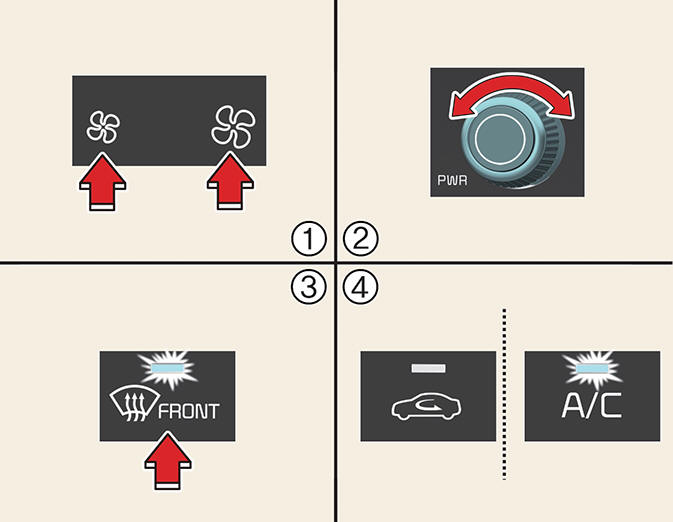
Defrosting/defogging windshield (Kia Niro EV)
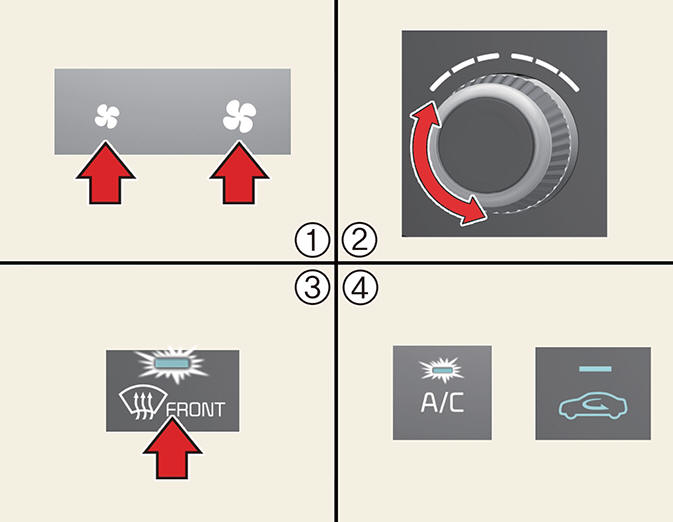
Operation
- Set the fan speed to the desired position.
- Select desired temperature.
- Select (
 ) or (
 ).
). - The outside (fresh) air and air conditioning will be selected automatically.
WARNING- (Kia Niro Hybrid only)
Windshield heating
Do not use the  or
or position
during cooling operation in extremely
humid weather. The difference between
the temperature of the outside air and
the windshield could cause the outer
surface of the windshield to fog up,
causing loss of visibility. In this case, set
the mode selection to the
position
during cooling operation in extremely
humid weather. The difference between
the temperature of the outside air and
the windshield could cause the outer
surface of the windshield to fog up,
causing loss of visibility. In this case, set
the mode selection to the  position
and fan speed control to the lower
speed.
position
and fan speed control to the lower
speed.
READ NEXT:
 Auto defogging for automatic climate control
Auto defogging for automatic climate control
Operation
For Europe
Air conditioning will turn ON at
recirculation mode.
Mode will change to defrost to
direct airflow to the windshield.
Fan speed will increase.
Except Europe
Ai
Rear window/outside mirror defroster
Operation
Press the rear window defroster button.
The indicator appears when the
defroster is ON.
It turns OFF after approximately 20
minutes or when the vehicle is in OFF
position.
CAUTION
Conductors
To prevent damage to the c
Heat button (Kia Niro EV)
Operation
Electric vehicle uses a PTC heater to
control the heating of the vehicle.
If you press the button manually to
turn off the function, only the ventilation
function works.
To turn on the PTC heater when the
HEAT button ind
SEE MORE:
Rear Cross-Traffic Collision-Avoidance Assist settings
Rear Cross-Traffic Safety
Kia NIRO Hybrid
Kia Niro EV
A: Driver assistance
Parking safety
Rear cross-traffic safety
With the vehicle on, touch Settings →
Driver Assistance → Parking Safety →
Rear Cross-Traffic Safety f
Replacing inner panel
fuse
Operation
Turn the vehicle and all other switches
off.
Open the fuse panel cover.
Pull the suspected fuse straight out.
Use the removal tool (1) provided in
the main fuse box in the engine compartment.
Check the remove
Categories
- Home
- KIA Niro EV, Hybrid - Second generation - (SG2) (2021-2024) - Owner's manual
- Kia Niro - First generation - (DE) (2017-2022) - Service and Repair Manual
- Contact Us
