
KIA Niro: Parking Distance Warning (PDW)
Kia Niro - First generation - (DE) (2017-2022) - Service and Repair Manual / Advanced Driver Assistance System (ADAS) / Parking Distance Warning (PDW)
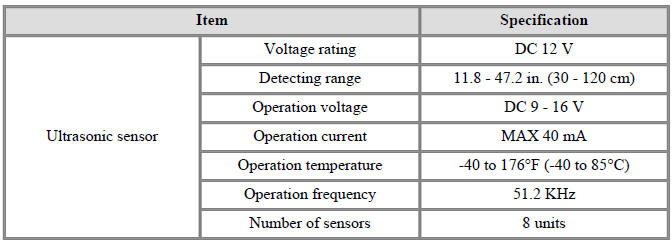
Specifications
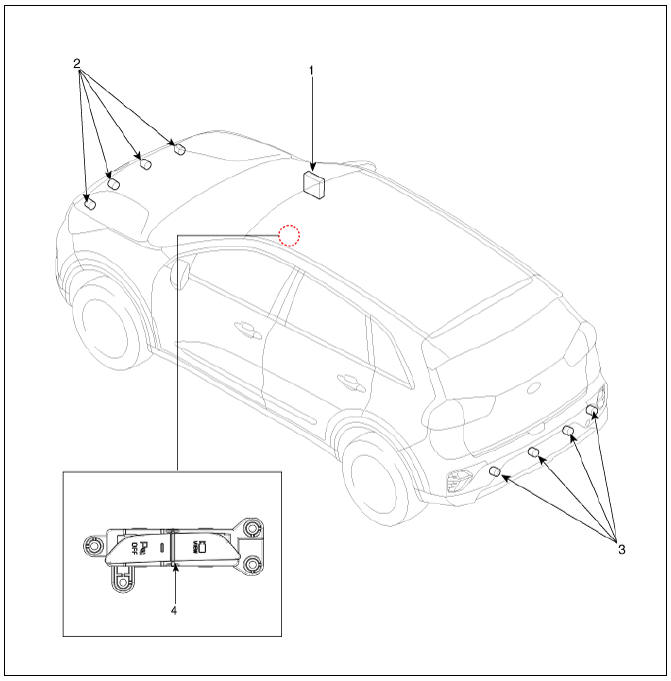
- Integrated body control unit (IBU)
- Parking distance warning-forward (PDW-F) sensor
- Parking distance warning-reverse (PDW-R) sensor
- PDW on/off switch
Parking Distance Warning (PDW) Description And Operation
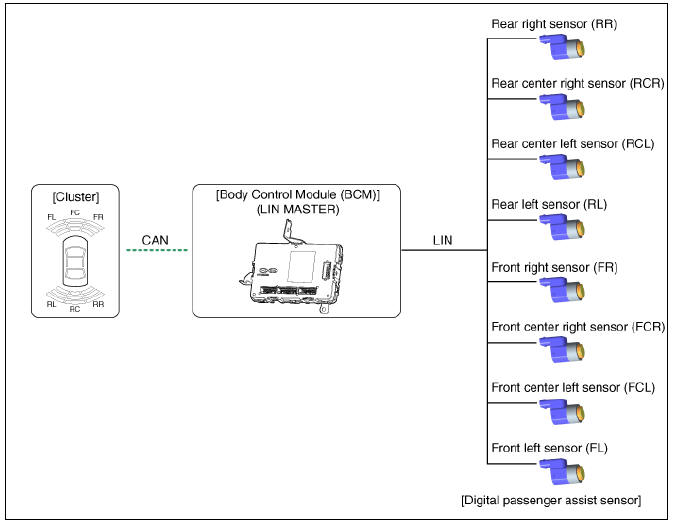
- PDW consists of 8 sensors (front : 4 units, rear : 4 units) that are used to detect obstacles and transmit the result in three separate warning levels, the first, second and third to BCM via LIN communication.
- BCM decides the alarm level by the transmitted communication message from the slave sensors, then operates the buzzer or transmits the data for display.
Block Diagram
READ NEXT:
 System Operation Specification
Initial mode
System initializing time
PDW-F : 500ms after IGN1+ initial D Gear + below 10 Km/h
PDW-R : 500ms after IGN1+ initial R Gear
PDW recognizes LID and sets the sensor ID up during initialization.
PDW activates each sensor
Parking Distance Warning (PDW) Sensor
Connector and Terminal function
Circuit Diagram
Removal
PDW-F (Parking Distance Warning-Forward) Sensor
Remove the front bumper assembly.
(Refer to Body - "Front Bumper Assembly")
Disconnect the connector (A) from t
SEE MORE:
Power Windows / Description And Operation
Power Windows / Components And Components Location
Driver power window switch
Assist power window switch
Rear power window switch
Front window motor
Rear window motor
Power Windows / Description And Operation
Power Window Sa
Charging connector lock
Locking charging cable
A: EV Settings
Charging connector locking mode
Always lock
Lock while charging
You may select when the charging connector
can be locked and unlocked in
the charging inlet.
Select EV → setting icon on the
Categories
- Home
- KIA Niro EV, Hybrid - Second generation - (SG2) (2021-2024) - Owner's manual
- Kia Niro - First generation - (DE) (2017-2022) - Service and Repair Manual
- Contact Us
