
KIA Niro: Rear View Monitor operation
Parking/View button
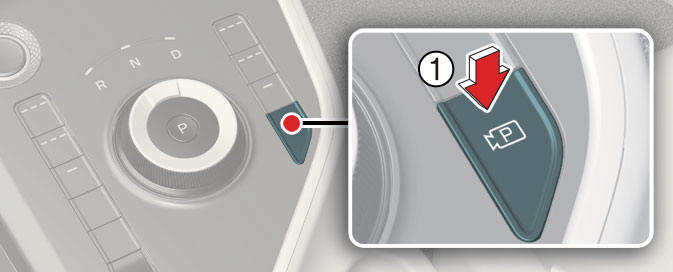
Press the Parking/View button (1) to turn on Rear View Monitor.
Press the button again to turn off the function.
Rear view function
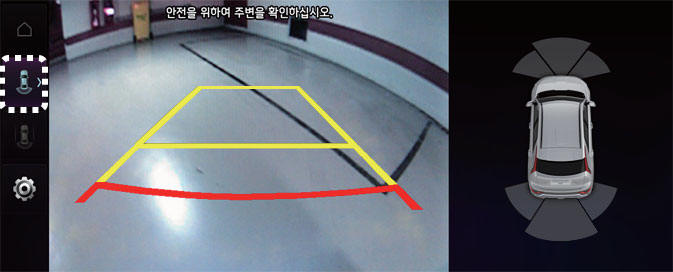
Operating conditions
Rear View Monitor will turn on when the following conditions are satisfied:
- Shifting the gear to R (Reverse).
- Pressing the Parking/View button (1) while P (Park) gear position is selected
- Pressing the View icon with the Rear top view on the screen
Off conditions
Rear View Monitor will turn off when the following conditions are satisfied:
- Pressing the Parking/View button (1) again while P (Park) gear position is selected. with the rear view on the screen.
- Changing the gear from R (Reverse) to P (Park).
NOTICE
Rear View Monitor will not turn off when the vehicle is in R (Reverse).
Extended Rear View Monitor
Extended Rear View Monitor function maintains the rear view of the vehicle when shifting the gear from R (Reverse) to N (Neutral) or D (Drive) to help you park safely.
Operating conditions
Rear View Monitor will maintain when the following conditions are satisfied:
- Shifting the gear from R (Reverse) to N (Neutral) or D (Drive).
- The vehicle speed is below approximately 10 km/h (6 mph).
Off conditions
Extended Rear View Monitor function will turn off when one the following conditions are satisfied:
- The vehicle speed is above approximately 10 km/h (6 mph).
- Pressing the Parking/View button (1).
- Shifting the gear to P (Park).
Rear View while driving
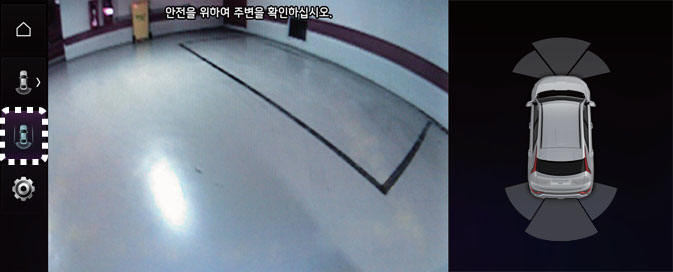
The driver is able to check the rear view on the screen while driving, it is to assist with safe driving.
Operating conditions
Rear View while driving will turn on under the following conditions:
- The Parking/View button (1) is pressed, while the gear is in N (Neutral) or D (Drive).
Off conditions
Rear View while driving will turn off under the following conditions:
- The gear is shifted to P (Park).
- The Parking/View button is pressed or the infotainment system button is pressed.
Rear Top View
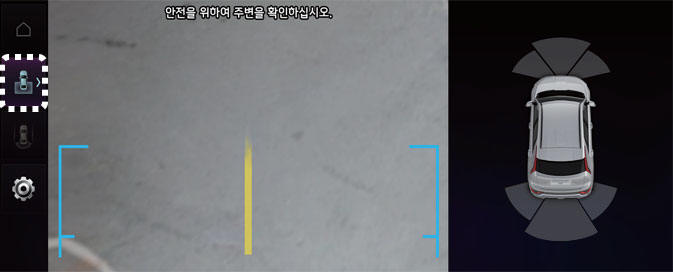
Rear Top View shows the rear top view of your vehicle when parking for you to check the distance between an object and behind the vehicle.
Rear Top View will turn on under the following conditions:
- The gear is shifted to R (Reverse) and the icon is selected among the view buttons.
- The Parking/View button is pressed, while the gear is in P (Park), N (Neutral) or D (Drive), and vehicle speed is 10 km/h (6 mph) or less.
READ NEXT:
 Rear View Monitor malfunction and limitations
Rear View Monitor malfunction
When Rear View Monitor is not working
properly, or the screen flickers, or the
camera image does not display properly,
Kia recommends visiting an authorized
Kia dealer/service partner.
Limitations of Rear View Moni
Rear Cross-Traffic Collision-Avoidance Assist (RCCA)
Rear Cross-Traffic Collision-Avoidance
Assist is designed to help detect vehicles
approaching from the left and right side
while your vehicle is reversing, and warn
the driver that a collision is imminent
with a warning message and an audible
w
Rear Cross-Traffic Collision-Avoidance Assist settings
Rear Cross-Traffic Safety
Kia NIRO Hybrid
Kia Niro EV
A: Driver assistance
Parking safety
Rear cross-traffic safety
With the vehicle on, touch Settings →
Driver Assistance → Parking Safety →
Rear Cross-Traffic Safety f
SEE MORE:
Air bag warning labels
Left-hand drive
Right-hand drive
Air bag warning label (Type A)
Air bag warning label (Type B)
Air bag warning labels are attached to
alert the passengers of potential risk of
air bag system.
Note that these government warnin
Forward Collision-Avoidance Assist malfunction and limitations
(Kia Niro Hybrid only)
A: Check forward safety systems
When Forward Collision-Avoidance
Assist is not working properly, the warning
message will appear, and the ( )
and ( ) warning lights will appear
on
the cluster. Kia recommends visitin
Categories
- Home
- KIA Niro EV, Hybrid - Second generation - (SG2) (2021-2024) - Owner's manual
- Kia Niro - First generation - (DE) (2017-2022) - Service and Repair Manual
- Contact Us
