
KIA Niro: Rear Cross-Traffic Collision-Avoidance Assist (RCCA)
Rear Cross-Traffic Collision-Avoidance Assist is designed to help detect vehicles approaching from the left and right side while your vehicle is reversing, and warn the driver that a collision is imminent with a warning message and an audible warning. Also, braking is assisted to help prevent collision.
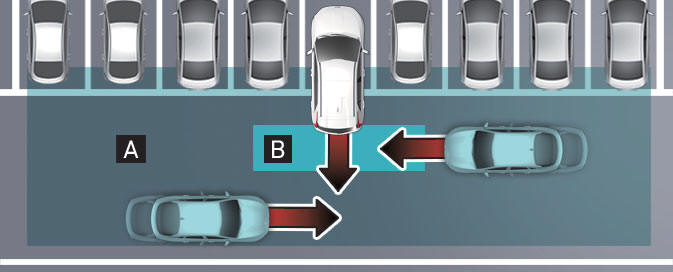
[A]: Rear Cross-Traffic Collision Warning operating range
[B]: Rear Cross-Traffic Collision-Avoidance Assist operating range
CAUTION
Warning timing may vary depending on vehicle speed of the approaching vehicle.
Detecting sensor
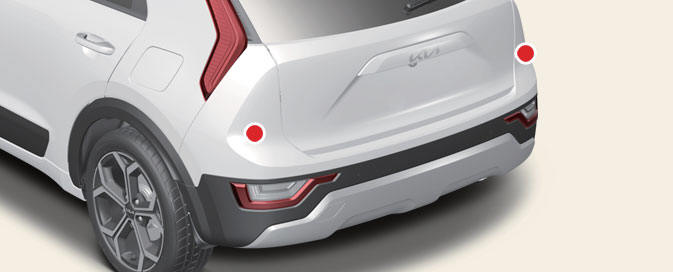
Rear corner radar
Refer to the picture above for the detailed location of the detecting sensors.
NOTICE
For more details on the precautions of the rear corner radar, refer to "Blind- Spot Collision-Avoidance Assist (BCA) (if equipped)"
- Rear Cross-Traffic Collision-Avoidance Assist settings
- Rear Cross-Traffic Collision-Avoidance Assist operation
- Stopping vehicle and ending brake control
- Rear Cross-Traffic Collision-Avoidance Assist malfunction
- Limitations of Rear Cross-Traffic Collision-Avoidance Assist
READ NEXT:
 Rear Cross-Traffic Collision-Avoidance Assist settings
Rear Cross-Traffic Safety
Kia NIRO Hybrid
Kia Niro EV
A: Driver assistance
Parking safety
Rear cross-traffic safety
With the vehicle on, touch Settings →
Driver Assistance → Parking Safety →
Rear Cross-Traffic Safety f
Rear Cross-Traffic Collision-Avoidance Assist operation
Rear Cross-Traffic Collision-Avoidance
Assist will warn and control the vehicle
depending on collision risk level:
'Collision warning', 'Emergency braking'
and 'Stopping vehicle and ending brake
control'.
Collision warni
Stopping vehicle and ending brake control
A: Drive carefully
When the vehicle is stopped due to
emergency braking, the warning message
will appear on the cluster.
Brake control will end after the vehicle
is stopped by emergency braking for
approximately 2 seconds.
During
SEE MORE:
Safe Exit Assist settings
Exit Safety
Kia NIRO Hybrid
Kia Niro EV
A: Driver Assistance
Driving Safety
Exit Safety
With the vehicle on, touch Settings →
Driver Assistance → Warning Volume
on the instrument cluster or Settings →
Vehicle →
Smart Cruise Control malfunction
A: Check Smart Cruise Control System
When Smart Cruise Control is not working
properly, the warning message will
appear, and the ( ) warning light
will
appear on the cluster. Have Smart
Cruise Control be inspected by a professional
worksh
Categories
- Home
- KIA Niro EV, Hybrid - Second generation - (SG2) (2021-2024) - Owner's manual
- Kia Niro - First generation - (DE) (2017-2022) - Service and Repair Manual
- Contact Us
