
KIA Niro: Right remote control switch (Cruise control switch)
Kia Niro - First generation - (DE) (2017-2022) - Service and Repair Manual / Advanced Driver Assistance System (ADAS) / Front Radar System / Right remote control switch (Cruise control
switch)
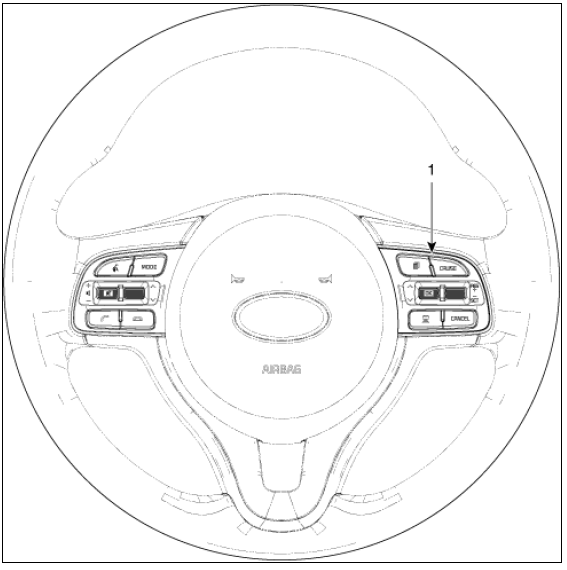
- Right remote control switch (Cruise control switch)
Circuit Diagram
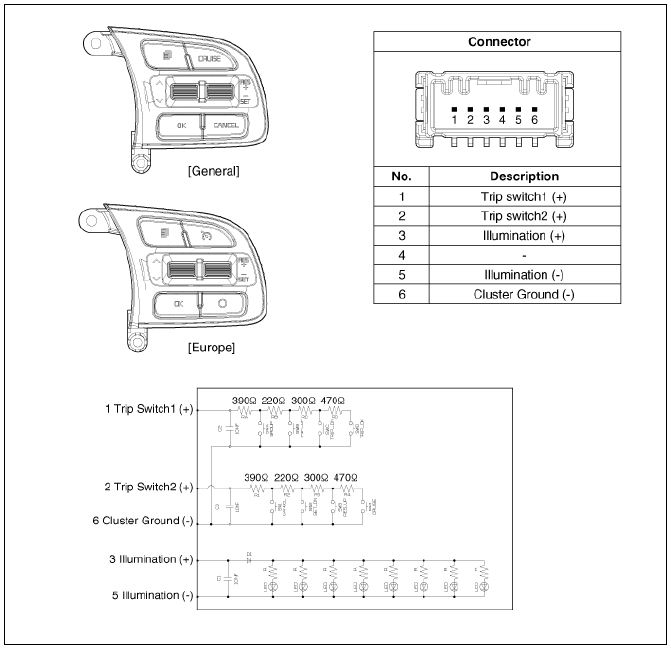
Right remote control switch Repair Procedures
Removal
- Remove the steering wheel remote controller. (RH) (Refer to Body Electrical System - "AVN Remote Controller")
Installation
- Install in the reverse order of removal.
Inspection
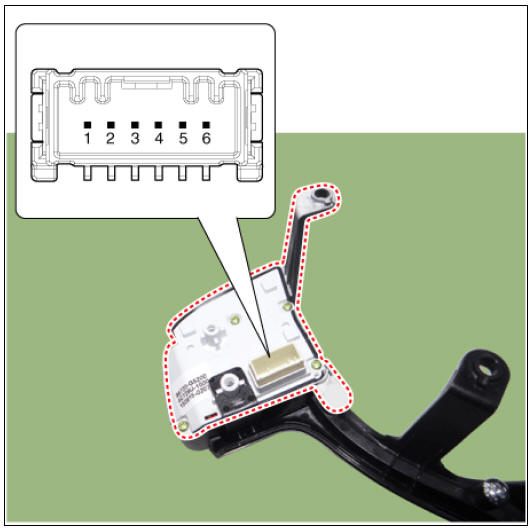
- Check for resistance between terminals in each switch position.


READ NEXT:
 Rear Corner Radar System
Rear corner radar
BCW & RCCW Indicator
Blind-Spot Collision Warning (BCW) ON/OFF switch
Description
System Interface
System Function
Blind-Spot Collision Warning (BCW)
Sends an audible warning and signal on the mirror wh
Blind-Spot Collision Warning (BCW)
BCW activation condition
(1) BCW on/off switch : On (indicated by the switch LED)
(2) Vehicle Speed : 30 - 255 km/h (20 - 158 mph)
(3) Relative vehicle speed : -10 to 255 km/h (-6 to 158 mph)
(Negative value refers to the distance of the veh
Rear Cross-traffic Collision Warning (RCCW)
BCW activation condition
(1) BCW on/off switch : On (indicated by the switch LED)
(2) Vehicle Speed : 30 - 255 km/h (20 - 158 mph)
(3) Relative vehicle speed : -10 to 255 km/h (-6 to 158 mph)
(Negative value refers to the distance of the veh
SEE MORE:
Room lamp (Kia NIRO Hybrid
Type A
Type B
Operation
Press the switch to turn the room
lamp on and off.
Luggage room lamp (Kia NIRO Hybrid
Operation
Open the tailgate. The lamp will turn
on.
Vanity mirror lamp (if equipped)
Operation
The
General safety information and caution
Precautions
General Precautions
Please read the following precautions carefully before performing the airbag
system service.
Observe the instructions described in this manual, or the airbags could
accidentally deploy and cause damage or injur
Categories
- Home
- KIA Niro EV, Hybrid - Second generation - (SG2) (2021-2024) - Owner's manual
- Kia Niro - First generation - (DE) (2017-2022) - Service and Repair Manual
- Contact Us
