
KIA Niro: Automatic climate control system
KIA Niro EV, Hybrid - Second generation - (SG2) (2021-2024) - Owner's manual / Features of your vehicle / Automatic climate control system
Kia NIRO Hybrid
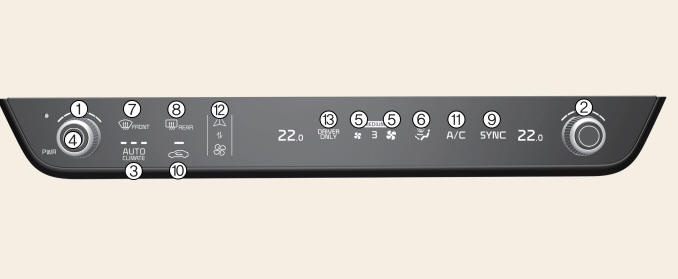
Type A
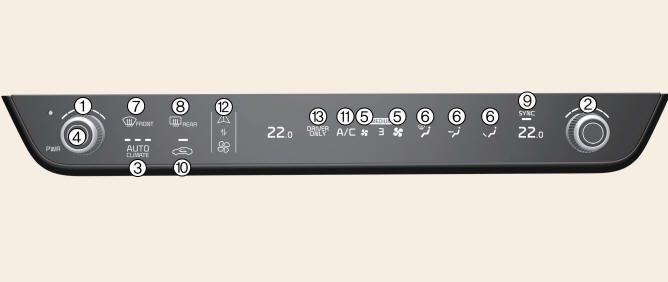
Type B
- Driver's temperature control knob
- Passenger's temperature control knob
- AUTO (automatic control) button
- OFF button
- Fan speed control button
- Mode selection button
- Front windshield defroster button
- Rear window defroster button
- SYNC button
- Air intake control button
- Air conditioning (A/C) button
- Infotainment/climate control mode switching button
- Driver's side only button
CAUTION
Operating the blower when the vehicle is in the ON position could cause the battery to discharge. Operate the blower when the engine is running.
Kia Niro EV
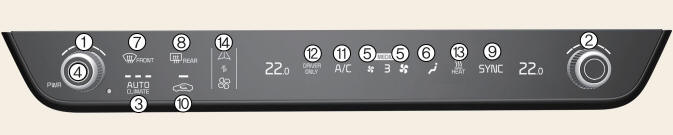
Type A

Type B
- Driver's temperature control knob
- Passenger's temperature control knob
- AUTO (automatic control) button
- OFF button
- Fan speed control button
- Mode selection button
- Front-windshield defroster button
- Rear-window defroster button
- SYNC button
- Air intake control button
- Air conditioning A/C button
- Driver only select button
- HEAT button
- Infotainment/climate control mode switching button
- Using the infotainment/climate switchable controller control panel (Kia Niro EV / Hybrid )
- Operating climate control system
- Controlling heating and air conditioning automatically
- Controlling fan speed (Kia NIRO Hybrid)
- Controlling fan speed (Kia Niro EV)
READ NEXT:
 Using the infotainment/climate switchable controller control panel (Kia Niro EV / Hybrid )
Using the infotainment/climate switchable controller
Press the button on the switchable controller to switch between infotainment system or climate control panel.
Press and hold the button to select the default mode for the control panel.
Switc
Operating climate control system
Left-hand drive
Right-hand drive
Operating climate control system- (Kia Niro Hybrid only)
Operating climate control system- (Kia Niro EV only)
Operation
Start the vehicle.
Set the mode-selection buttons as
desired. To impr
Controlling heating and air conditioning automatically
Controlling heating and air conditioning automatically-
Kia NIRO Hybrid
Controlling heating and air conditioning automatically-
Kia Niro EV
Operation
Set the desired temperature.
Press the AUTO button to control:
Mode
Fan
SEE MORE:
Brake fluid
Checking brake fluid level (Kia NIRO Hybrid)
Checking brake fluid level (Kia Niro EV)
Operation
Clean the area around the reservoir
cap.
Periodically check that the fluid level
in the brake fluid reservoir is between
MIN and MAX
Relay Box (Passenger Compartment)
IGPM
Description
Communication Network Diagram
Integrated Gateway & Power control Module (IGPM)
Integrated Gateway & Power control Module (IGPM) is a module that performs
the function of conventional Junction Block and
Categories
- Home
- KIA Niro EV, Hybrid - Second generation - (SG2) (2021-2024) - Owner's manual
- Kia Niro - First generation - (DE) (2017-2022) - Service and Repair Manual
- Contact Us
