
KIA Niro: Next departure
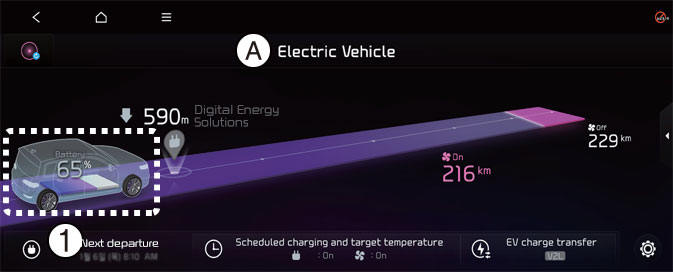
A: Electric vehicle
- Next departure
Select EV → Next departure on the screen. You can set the date and time of when to charge the battery, climate control temperature, and other various functions.
Departure time
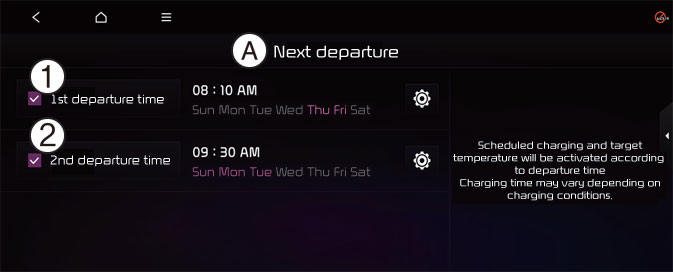
A: Next departure
- 1st departure time
- 2nd departure time
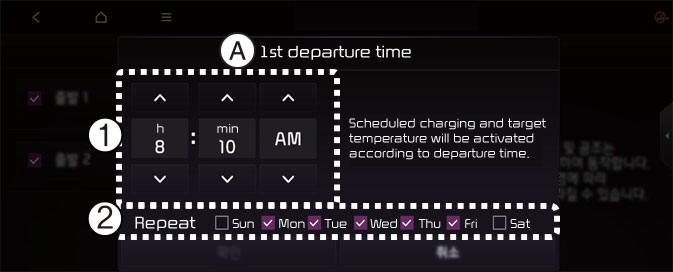
A: Departure 1
- Departure Time
- Departure Day
- Set anticipated departure time for scheduled charging and target temperature.
- Select the day of the week to activate scheduled charging and target temperature for departure time.
NOTICE
The infotainment system may change after software updates. For more information, refer to the manual provided in the infotainment system and the quick reference guide.
READ NEXT:
 Charging and climate
A: Electric Vehicle
Scheduled charging and target
temperature
Select EV → Scheduled charging and
target temperature on the screen.
NOTICE
Vehicle must be connected with the
charging connector at the time prescheduled
time for the
Vehicle to load (V2L)
V2L is the system that provides AC
power using the high voltage battery for
driving to operate several electronical
products.
A: Electric Vehicle
EV Charge Transfer
Select EV → EV Charge Transfer on the
screen.
You can set the ba
How to connect
Outdoor (if equipped)
Open the cover of the V2L connector.
Close the cover after connecting
home appliances and electronic products
to the power outlet.
Connect the V2L connector to the
charging hole on the vehicle.
Pr
SEE MORE:
Refrigerant System Service Basics (R- 1234yf)
Refrigerant Identification
Do not mix HFO-1234yf (R-1234yf) in the vehicle with other refrigerant,
such as R-12, R-134a and etc.
Use only the UL-listed service equipment certified to meet the
requirements of SAE standards to recover and r
Trailing Arm Repair procedures
Removal
Disconnect the battery negative cable.
Remove the wheel and tire.
Tightening torque:
107.9 - 127.5 N*m (11.0 - 13.0 kgf*m, 79.6 - 94.0 lb*ft)
Warning
Be careful not to damage the wheel nuts when removing the wheel and
tire.
Categories
- Home
- KIA Niro EV, Hybrid - Second generation - (SG2) (2021-2024) - Owner's manual
- Kia Niro - First generation - (DE) (2017-2022) - Service and Repair Manual
- Contact Us
