
KIA Niro: Setting memory position
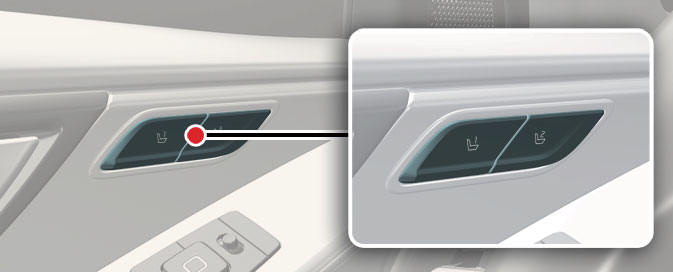
Operation
- Adjust the following position:
- Driver's seat position
- Outside mirror position (if equipped)
- Head-up display (HUD) (if equipped)
- After then, press '1' or '2' button.
- Press and hold about 1 second.
- The system will beep twice and notify you.
- 'Driver 1 (or 2) settings saved' will appear on the infotainment screen.
INFORMATION
The vehicle should be in the ON position to use this function.
Recalling memory position
Operation
- Press the '1' or '2' button.
- The system will beep once.
- After then, stored positions will be adjusted.
- 'Driver 1 (or 2) settings applied' will appear on the infotainment screen.
Non-operating condition(s)
- When driving speed exceeds 3 km/h (2 mph).
READ NEXT:
 Resetting the driver position memory system
Operation
Shift to P (Park) while the EV button is
in the ON position.
Move the driver seat as forward as
possible.
Move the seatback to a fully upright
position.
Press the '1' button and seat forward
movement switch s
Tailgate
Opening/closing the manual tailgate
Operation
Press the outside handle switch (1) to
open the tailgate.
Pull up the tailgate.
Push down the tailgate to close it.
Make sure that the tailgate is securely
latched.
Operating conditi
Power tailgate
Operating the power tailgate
Operation
Press the power tailgate open/close
button inside the vehicle or with the
smart key for 1 second. The power
tailgate opens with a warning sound.
Press and hold the power tailgate
open/clos
SEE MORE:
Rain Sensor Repair procedures
Inspection
Check point for rain sensor:
To properly adjust sensitivity if auto wiping operates sensitively or
insensitively.
To check if a connector of sensor is normally connected
To check if sensor and bracket are normal
Tire chains (Kia NIRO Hybrid)
wire-type
fabric-type
Since the sidewalls of radial tires are
thinner, they can be damaged by
mounting some types of snow chains on
them. Therefore, the use of snow tires is
recommended instead of snow chains.
Do not mount tire chains
Categories
- Home
- KIA Niro EV, Hybrid - Second generation - (SG2) (2021-2024) - Owner's manual
- Kia Niro - First generation - (DE) (2017-2022) - Service and Repair Manual
- Contact Us
