
KIA Niro: Auto Lighting Control System
Kia Niro - First generation - (DE) (2017-2022) - Service and Repair Manual / Body Electrical System / AC Inverter System / Auto Lighting Control System
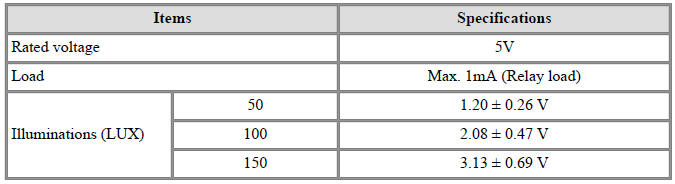
Specifications
Auto Lighting Control System / Components And Components Location
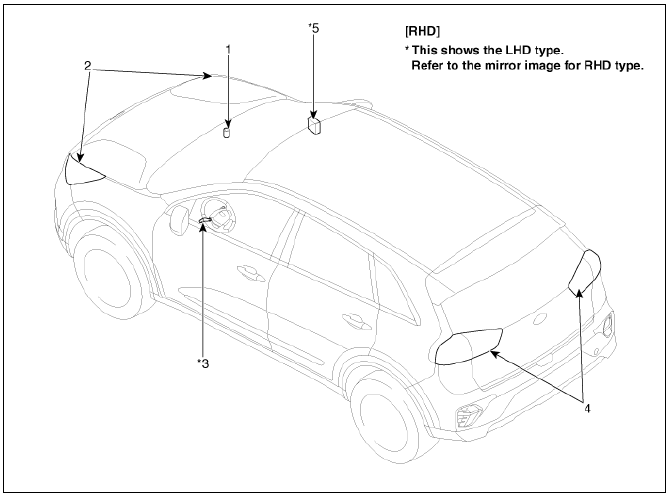
- Auto light sensor
- Headlamps
- Lighting switch (Auto)
- Rear combination lamps
- BCM (Body Control Module)
Description
- It's a system that uses illumination sensor to automatically turn ON the tail lamp and head lamp based on the change in surrounding environment's illumination condition.
- It activates when the vehicle enters/exits tunnel, or when the illumination condition in surrounding environment changes due to rain, snow, or fog.
Auto Lighting Control System / Schematic Diagrams
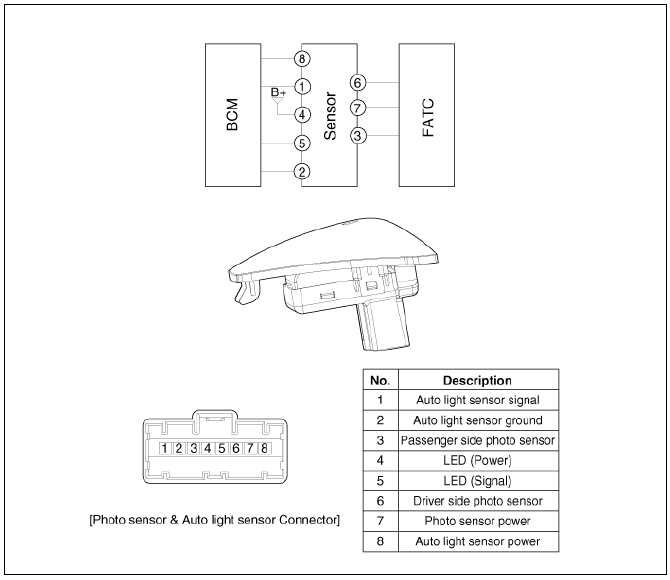
Auto Light Sensor Repair procedures
Removal
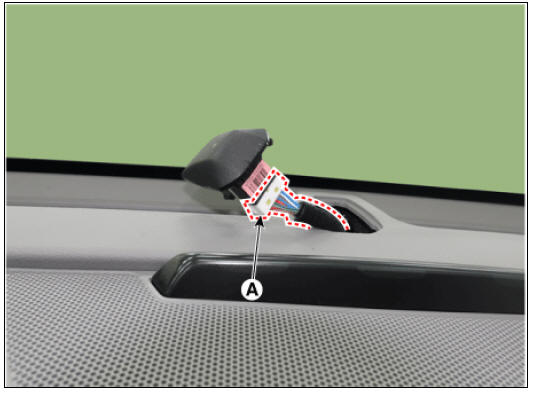
- Remove the auto light sensor (A) from the main crash pad.
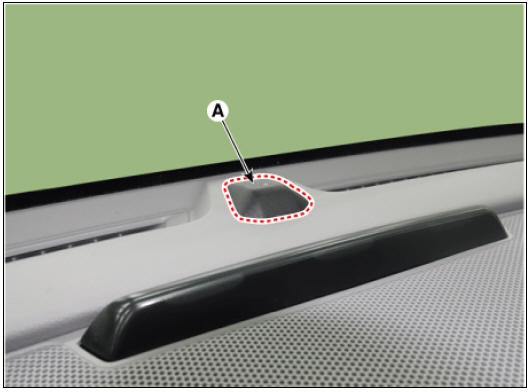
- Disconnect the connector (A) from the auto light sensor.
Installation
- Install in the reverse order removal.
READ NEXT:
 AVN System / Description And Operation
AVN System / Components And Components Location
AVN head unit
External amplifier
Crash pad LTE antenna
Roof LTE antenna
Multimedia jack
Steering wheel remote control (SWRC)
Hands-free mic (Built-in overhead console)
Description
Vehicle Information Systems (UVO)
AVN head unit
Crash pad LTE antenna (Wi-Fi, LTE 2)
UVO Keypad
Roof LTE antenna (AM/FM + DMB + GPS + LTE 1)
Description
Vehicle information systems (UVO) based on state-of-the-art IT systems,
safety and security
Warning
The term &
SEE MORE:
Basic Troubleshooting
Basic Troubleshooting Guide
Customer Problem Analysis Sheet
Basic Inspection Procedure
Measuring Condition of Electronic Parts' Resistance
The measured resistance at high temperature after vehicle
running may be high or low. So all
Hybrid Starter Generator(HSG)
Component location
HPCU (Hybrid Power Control Unit)
(LDC+MCU+HCU+Reservoir)
Hybrid drive motor
Hybrid starter generator (HSG)
Electrical radiator
Electric water pump (EWP)
Specification
Inspection
Inspect the line to lin
Categories
- Home
- KIA Niro EV, Hybrid - Second generation - (SG2) (2021-2024) - Owner's manual
- Kia Niro - First generation - (DE) (2017-2022) - Service and Repair Manual
- Contact Us
